

Picture this: you're sitting at home, miles from your property, and your phone buzzes. It's a real-time photo of that monster buck you've been tracking, stepping right into your food plot. That’s the power of trail cameras that send photos to your phone. Think of them as your eyes in the woods—a tough, camouflaged scout that texts you pictures the second they’re taken.
Your Instant Window to the Wilderness
We've all been there. You trek for miles to a remote hunting spot, full of anticipation, only to pull an SD card full of pictures of squirrels and swaying branches. It’s a frustrating waste of time, and worse, you’ve just spread your scent all over the area and disturbed the very animals you’re trying to pattern.
Cellular trail cameras completely change the game. They cut out the guesswork and intrusion by creating a direct, live feed from the field straight to your phone.
This isn't just about convenience; it's about making smarter, faster decisions. For hunters, it’s knowing exactly which stand to climb into based on that morning's activity. For landowners, it’s getting an instant alert if someone is trespassing. For researchers, it’s gathering undisturbed data on shy or elusive species.
A Rapidly Growing Market
It's no surprise that the demand for this instant connection is blowing up. The hunting and trail camera market is on track to grow from USD 224.08 million in 2024 to a staggering USD 375.16 million by 2034. Here in North America, an estimated 62% of hunters now rely on these cameras to pattern game, getting immediate photos sent to apps from brands like Browning or Wildgame Innovations. This trend makes one thing clear: real-time monitoring isn't a luxury anymore; it's a core tool for anyone serious about wildlife management or property security. You can dig into the numbers with these market growth insights.
Here’s the bottom line: A traditional trail camera shows you what happened yesterday. A cellular trail camera lets you watch it happen right now. That single difference transforms scouting from a passive chore into a massive strategic advantage.
Keeping Your Connection Alive
With a constant stream of intel coming in, your smartphone basically becomes your command center. It’s where you view photos, tweak camera settings, and track animal movement patterns.
To make sure you never miss a critical update, it's smart to explore efficient wireless charging solutions that keep your phone powered up and ready. Ultimately, these cameras give you more than just pictures—they deliver peace of mind and actionable intelligence, 24/7.
How Trail Cameras Send Photos to Your Phone
Ever wonder about the magic that happens when a big buck strolls past your trail camera, and its picture pops up on your phone just minutes later? It’s not actually magic, but it’s a brilliant mix of technologies we use every day, working together from deep in the woods.
Think of your trail camera as a rugged, camouflaged smartphone with one job: taking pictures.
The vast majority of trail cameras that send photos to your phone run on a cellular network. Just like your own phone, these cameras have a built-in SIM card and a modem. When the camera’s sensor detects movement, it snaps a photo. It saves the full-resolution original to an SD card, then uses its modem to connect to the nearest 4G or 5G cell tower.
From that tower, the image travels over the cellular network to a secure cloud server run by the camera company. Your app—like the MAGIC EAGLE app—connects to that server, downloads the photo, and buzzes your phone with a notification. This whole process usually happens in just a few seconds to a couple of minutes. You get a near-instant look at what’s happening on your property, no matter where you are.
This diagram breaks down how your camera communicates with your phone from the field.
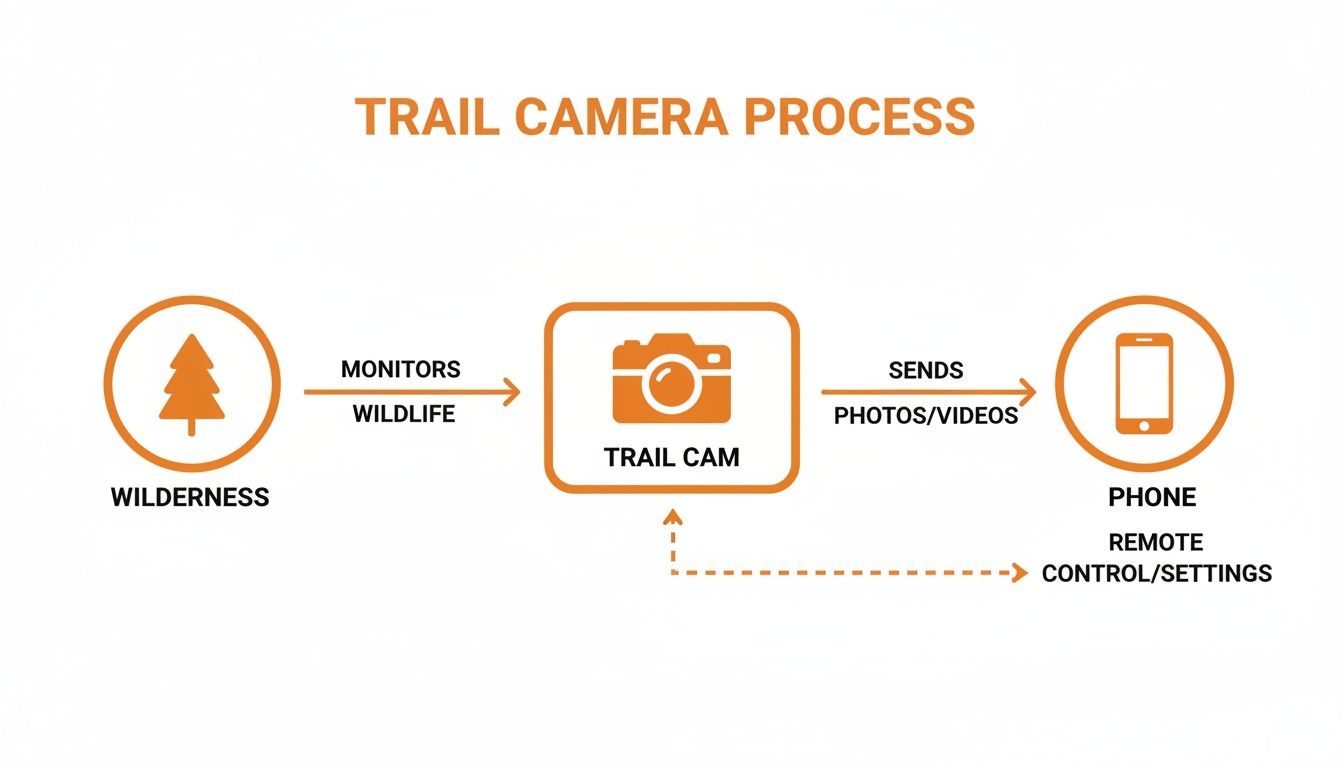
It really comes down to three simple steps: the camera captures the moment, the cell network sends the data, and your phone gives you instant access.
Breaking Down the Main Transmission Methods
While cellular is king for remote monitoring, it helps to know the other ways cameras can talk to your phone. Each method has a different job, kind of like choosing between sending a text, Airdropping a file, or pairing your headphones.
- Cellular (4G/5G): This is the long-range champion. It's perfect for spots miles away from any Wi-Fi signal. You’ll need a data plan, but it’s the only way to get true remote monitoring.
- Wi-Fi: Some cameras can connect to an existing Wi-Fi network, which is great for backyard security or keeping an eye on a barn that’s within range of your home router. Its range is usually limited to a few hundred feet.
- Bluetooth: This is a very short-range connection, like pairing your phone with a speaker. It’s mainly used for initial setup or downloading photos when you're standing right next to the camera—typically within 50 feet.
Key Takeaway: For almost every hunting, research, or remote property situation, cellular is the only practical choice. It frees your camera from any range limits, delivering photos from anywhere with a cell signal right to your phone.
The Role of the SIM Card and Data Plan
One of the most common points of confusion is the SIM card. You can’t just pop the SIM from your old phone into a trail camera. Manufacturers install their own SIM cards that are locked to their systems and network partners, like AT&T or Verizon.
This actually makes things way easier for you. There’s no need to go to a carrier’s store and try to explain what you’re doing. You just activate the camera through the manufacturer’s app and pick a data plan right on your phone. If you want to dive deeper, check out our guide on how cellular trail cameras work.
Data plans for trail cams are designed for sending photos, not streaming movies, so they’re much more affordable than a standard phone plan. They usually range from $5 to $15 per month, often based on how many pictures you need. Many companies also offer discounts on annual plans or flexible options to share data across multiple cameras, making it cost-effective to monitor an entire property.
Choosing the Right Cellular Trail Camera
Picking the right cellular trail camera can feel like you're lost in a forest of technical specs. With so many options out there, the secret is to tune out the marketing hype and lock in on what actually matters for your specific piece of land.
This isn't just about grabbing the camera with the biggest megapixel number. It's about matching the tool to the job—whether you're watching a remote food plot, securing a property line, or doing wildlife research. Nailing this choice upfront saves you a world of frustration and makes sure you get the reliable intel you need, when you need it.
These cameras are everywhere now, and for good reason. The market is exploding, set to hit USD 905.94 million in 2025 and projected to reach USD 1,420.95 million by 2032. This boom is fueled by real-world improvements like sharper sensors—cameras over 12MP now make up 40% of sales—and faster LTE connections that deliver photos in under a minute. You can dig deeper into the trail camera market's evolution if you're curious about the trends.
Match the Carrier to Your Location
This is the single most important decision you'll make. A trail camera is just a plastic box if it can't get a signal out.
-
Single-Carrier Cameras: A lot of models are locked to one network, like AT&T or Verizon. Before you even think about buying one, take your own cell phone out to the exact tree you plan to hang the camera on. Check the signal bars. No signal for your phone means no signal for the camera.
-
Multi-Carrier or Auto-Connect Cameras: This is where the smart tech comes in. Premium models with features like SignalSync technology automatically find and lock onto the strongest network in the area. It's a massive advantage in remote spots with spotty service and acts as a safety net if one carrier's tower goes down.
Think of it like this: Buying a camera without checking the signal first is like buying a boat without knowing if there’s water in the lake. It might be a great boat, but it won’t do you any good.
Decode the Data Plans
Every cellular camera needs a data plan to send you photos. The good news is they're way cheaper than a typical phone plan, but the costs can add up, especially if you're running a whole fleet of them.
Look for flexibility. Can you pay monthly, quarterly, or annually? More importantly, can you pause the service during the off-season? The best providers let you manage everything right from their app, with no hidden fees. For a head-to-head comparison, check out our complete breakdown of the best cellular trail camera plans on the market.
Essential Camera Specs That Matter
Once you've sorted out the signal and the data plan, it's time to look at the hardware. Don't get bogged down in the spec sheets. Just focus on these three things that make or break a camera's performance in the field.
-
Trigger Speed: This is how fast the camera wakes up and snaps a picture after it senses motion. A slow trigger (anything over 0.5 seconds) will get you a lot of photos of deer tails. For a busy game trail, you need a trigger speed of 0.3 seconds or faster to capture the whole animal, not just its backend.
-
Night Vision Flash Type: The camera’s infrared (IR) flash is what lights up the woods at night. You have two main choices:
- No-Glow IR: The flash is completely invisible to animals and humans. This is your go-to for security or for monitoring hyper-sensitive game that spooks easily.
- Low-Glow IR: This flash gives off a faint red glow that’s barely visible. The trade-off is that it often produces slightly brighter, clearer night photos than No-Glow. It's a fantastic all-around choice for most hunting and wildlife watching.
-
Battery Life: Sending photos over a cell network is a huge power drain. Look for cameras built for efficiency. Key features to look for are support for lithium AA batteries, an external port for a 12V battery pack, or a built-in solar panel that can keep it running for months on end.
Setting Up Your Camera for Instant Photo Alerts
Unboxing a new trail camera is a great feeling, but the real magic starts when the first photos land on your phone. Getting the setup right is what makes that happen, and it's the key to the instant alerts you’re after. Let's walk through the critical steps that the instruction manual often breezes over, so your camera works perfectly from day one.
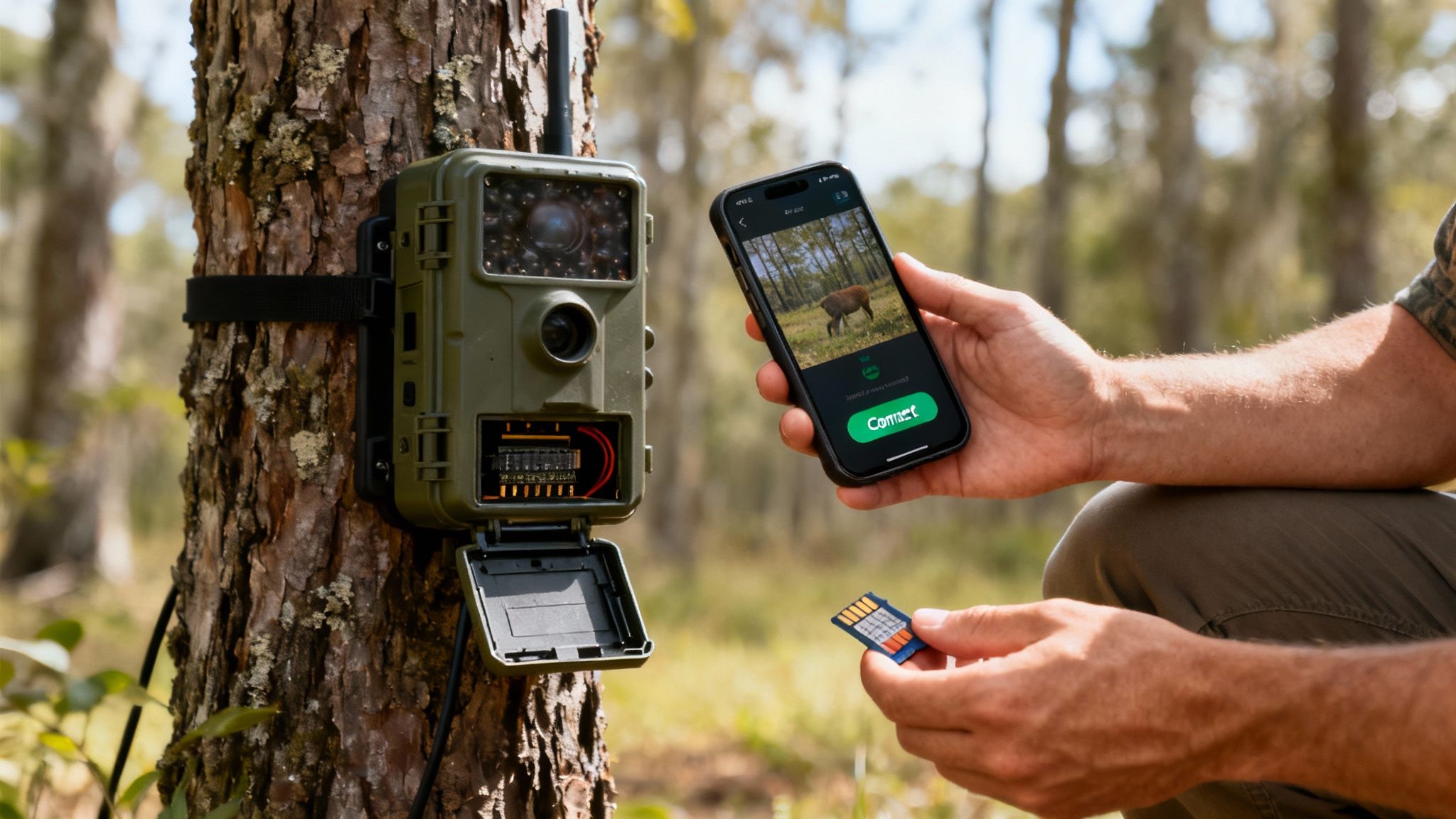
Your first move should always happen at home, not out in the woods. Before you do anything else, grab your smartphone and download the companion app—like the MAGIC EAGLE app—while you have a solid Wi-Fi connection. This app is your command center for everything to come.
Activating Your Connection
Modern trail cameras that send photos to your phone have made activation incredibly simple. Most models, including the EagleCam 5, ship with a SIM card already installed. Forget trips to the cell phone store; you'll handle the entire process right inside the app.
- Create an Account: Fire up the app and register. This is how you'll link the camera’s unique ID directly to your phone.
- Scan the QR Code: Pop open the camera’s housing and find the QR code printed inside or on the unit itself. Use the app to scan it, which instantly pairs the device.
- Select a Data Plan: The app will then show you the available data plans. Pick one that matches how you’ll use it—a quiet food plot might only need a few hundred photos a month, but a busy mineral lick could easily demand an unlimited plan.
Pro Tip: Always, always test your camera's connection from your backyard before you hike it out to a remote spot. Send a test photo and make sure it comes through. This simple five-minute check can save you a long, frustrating trip back to the woods just to find out you’re in a dead zone.
Powering Up for Performance
Sending photos over a cellular network is a power-hungry job. Honestly, using the wrong batteries is one of the most common reasons a camera fails in the field. Standard alkaline batteries just can't deliver the consistent voltage needed, especially when the temperature drops.
- Lithium AA Batteries: These are the gold standard, period. They perform incredibly well in extreme hot and cold weather and last way longer than alkalines, making sure your camera stays online all season.
- External Power Packs: For a true set-it-and-forget-it setup, look into a 12V rechargeable battery pack or a compatible solar panel. This minimizes your trips to the camera, reducing scent and disturbance.
Even though your photos are beamed to the cloud, a high-quality SD card is non-negotiable. The camera saves the original, full-resolution images and videos locally, giving you a crucial backup. Always use a Class 10 SD card from a good brand with at least 32GB of storage to avoid corrupted files or lost images.
For a deeper dive into setup, check out our complete guide on connecting a trail camera to your phone. With your power, storage, and connection locked in, you’re ready to dial in the settings that turn raw data into smart scouting.
Using Advanced Features for Smarter Scouting
Modern trail cameras have evolved far beyond simple picture-takers. They're now intelligent field tools designed to give you a serious strategic edge. The real power behind today's trail cameras that send photos to your phone isn't just the instant delivery; it's the advanced features that turn a flood of images into actionable intelligence.
These aren't gimmicks. They're practical solutions to the real-world headaches we all face in the field. They help you cut through the noise, manage your gear across large properties, and make smarter decisions without ever setting foot on your land.
The explosive growth of this technology tells the story. The global trail cameras market is on track to hit around USD 134.5 million in 2025, with North America gobbling up over 40% market share. This boom is driven by breakthroughs like AI and better battery life that make these cameras indispensable. If you're curious about the numbers, you can learn more about these market findings.
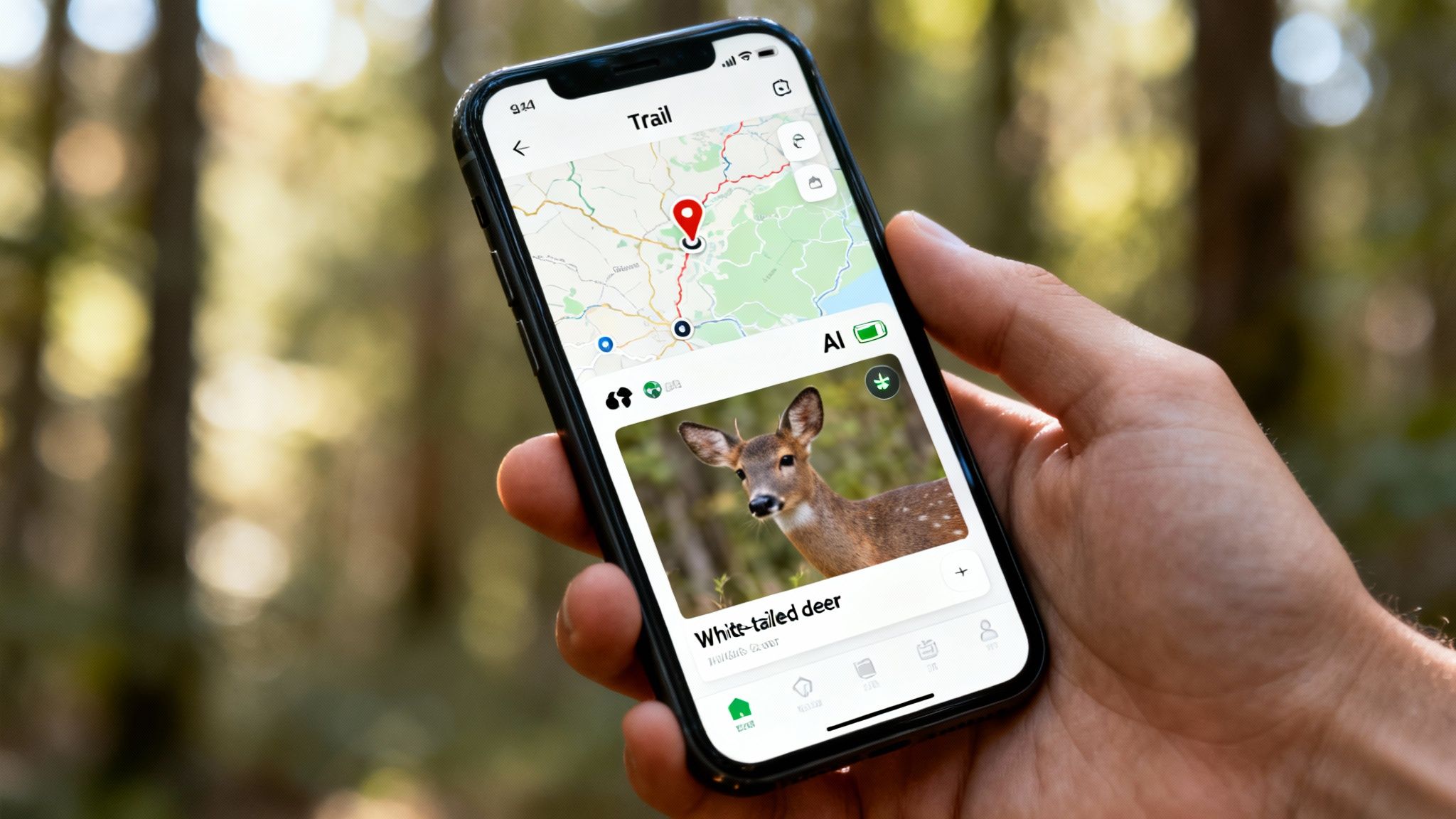
AI Species Recognition for a Clutter-Free Feed
Let's be honest—one of the biggest frustrations with older trail cams is the endless stream of false triggers. Photos of swaying branches, squirrels, or that same pesky raccoon can quickly fill up your feed, draining your time, data, and battery. This is where Artificial Intelligence (AI) completely changes the game.
AI-powered species recognition acts like a smart gatekeeper. The camera's brain is trained to know the difference between a deer, a turkey, or a person.
- You get alerts that actually matter. Instead of a generic "motion detected," your phone buzzes with a specific "deer detected" notification.
- It saves your resources. By filtering out the junk, the camera sends fewer photos, which stretches both your data plan and battery life.
- It organizes your gallery for you. Apps like MAGIC EAGLE automatically tag photos by species, letting you quickly review all your buck pictures without scrolling through hundreds of raccoon selfies.
This one feature transforms your camera from a simple motion detector into an efficient scouting assistant that only bothers you when something important happens.
GPS Mapping and Anti-Theft Protection
When you've got multiple cameras scattered across a big property, just keeping track of them is a chore. It's easy to forget exactly where you hung that camera months ago. Plus, let's face it, cellular trail cameras are a valuable piece of gear, making them a target for thieves.
GPS integration solves both of these problems at once. It’s not just a pin on a map; it's a complete asset management and security system that gives you total peace of mind.
Built-in GPS serves two critical functions:
- Camera Management: Inside the app, each camera’s location is plotted on a satellite map. This lets you see your entire scouting network at a glance, track how animals move between locations, and plan your routes in and out to avoid spooking game.
- Theft Deterrence: A smart anti-theft system is a powerful defense. If a camera is moved or stolen, you get an immediate alert. You can then use the GPS to track its location in real-time. Some systems, like the one in the EagleCam 5, can even keep tracking when the camera is powered off, making it much easier to get your property back.
Total Remote Control Through a Mobile App
The companion app is the heart and soul of any modern cellular trail camera. It's your command center, putting the power to manage every single aspect of your camera's operation right in your pocket, no matter where you are. A great app does way more than just show you pictures.
With a well-designed app, you can remotely:
- Tweak camera settings like trigger speed, photo quality, and how often it sends pictures.
- Check battery life and signal strength so you know when a camera needs a visit.
- Request an on-demand photo or HD video to get a better look at what’s happening right now.
- Organize and share photos with your hunting buddies or family.
This level of remote control means you can adapt your strategy on the fly based on changing weather or animal patterns, all without making a disruptive trip into the woods.
Here's a quick look at how these modern features solve common problems you've probably faced.
Advanced Feature Problem-Solver
| Feature | Common Problem It Solves | Real-World Example |
|---|---|---|
| AI Species Recognition | Getting hundreds of notifications for squirrels, raccoons, and wind-blown leaves, wasting battery and data. | Your app is set to only notify you when a deer is detected. You can ignore the 50 raccoon photos and focus on the two mature bucks that passed by. |
| GPS Tracking & Anti-Theft | Forgetting where cameras are located on a large property or having a camera stolen with no way to recover it. | A camera goes offline. You get an alert, check the app, and see its last known location on the map, helping you or law enforcement track it down. |
| SignalSync Technology | Weak or unreliable cell service in remote areas, causing missed photo transmissions and frustration. | Your camera automatically switches between AT&T and Verizon to find the strongest signal at its location, ensuring you get your pictures reliably. |
| Full App-Based Control | Having to physically visit a camera to change a simple setting, like photo resolution or trigger sensitivity, spooking game in the process. | You notice you're getting night photos of a buck. From your couch, you adjust the camera to video mode to better pattern his behavior without leaving your scent. |
These intelligent features are what separate a simple camera from a powerful scouting tool. They save you time, money, and trips into the field, ultimately making you a more efficient and successful hunter or researcher.
Troubleshooting Common Connectivity Problems
There’s nothing more frustrating. One minute, you’re getting a live feed of a buck scraping a tree; the next, radio silence. When your trail camera suddenly stops sending photos, it’s easy to assume the worst.
The good news? Most of the time, the fix is surprisingly simple. Before you start planning a trip out to the field or calling customer support, run through this quick diagnostic checklist. It’ll help you pinpoint the issue and get your camera back online without missing a beat.
Your Four-Point Diagnostic Checklist
When the pictures stop coming, the problem almost always falls into one of four buckets. The key is to start with the easiest fixes first and work your way down the list. This logical approach will save you time and an unnecessary trip to your camera’s location.
-
Check Your Data Plan: Did your plan run out of photos or expire? This is the #1 culprit and the easiest to check. Just open your camera’s app (like the MAGIC EAGLE app) and look at the billing or subscription section to make sure your plan is still active.
-
Verify Battery Levels: Sending photos over a cellular network takes a lot of juice. If your batteries are running low, the camera might have enough power to snap a picture but not enough to actually transmit it. Your app should show you the current battery status.
-
Inspect the SD Card: A full or corrupted SD card can bring everything to a halt, including transmissions. While your app should give you a heads-up on storage space, cards can sometimes go bad without warning. If nothing else works, you may need to physically check the card.
-
Confirm Signal Strength: Has a recent storm, new foliage, or even a shift in carrier coverage weakened the signal? Check the camera’s signal strength right in the app. A weak or nonexistent signal is a dead end for any photo trying to get out.
Think of it like a detective’s investigation. You always check the most likely suspects first—the data plan and batteries—before you start digging into more complex possibilities like a faulty SD card or a sudden drop in signal.
Actionable Fixes for Common Issues
Once you’ve identified the likely problem, the solution is usually straightforward. For many issues, you won’t even need to leave your couch, which is one of the biggest advantages of using trail cameras that send photos to your phone.
Problem: Weak or No Signal
Even the best camera locations can have bad signal days. If your camera’s signal strength looks poor, you have a couple of options to try.
- Manual Sync: Go into the app and trigger a manual sync or request a test photo. This forces the camera to re-establish its connection with the nearest cell tower and can often clear up a temporary network glitch.
- Booster Antenna: If the signal is consistently weak in that spot, think about adding a cellular booster antenna. These accessories can make a huge difference in fringe areas, turning an unreliable camera into your most consistent performer.
Problem: Camera Seems Unresponsive
If your camera isn’t responding to any commands from the app, the issue might just be a simple software hiccup.
Try a remote restart through the app. It's just like rebooting your computer—it clears out any temporary errors and forces the camera to start fresh without wiping your settings. Taking these steps can often save you a long walk and get your eyes back in the woods faster.
Frequently Asked Questions
Even after getting the basics down, you probably have a few specific questions bouncing around. Let's tackle the most common ones we hear from hunters, landowners, and researchers about trail cameras that send photos to your phone.
How Much Do Cellular Trail Camera Data Plans Cost?
This is always a top question, but the good news is they're way more affordable than your phone bill. Most companies offer a few tiers, usually starting around $5 per month for a couple hundred photos and going up to $25 per month for unlimited pictures.
Many brands, including Magic Eagle, also have annual plans that save you money in the long run. They often have flexible data-sharing options, too. These are a game-changer if you’re running multiple cameras, letting you pool all your data into one bucket to monitor several spots without breaking the bank.
Can I Use My Own SIM Card in My Trail Camera?
It's a logical question, but the answer is almost always no. Today's cellular trail cameras are built as a complete package. They come with a specific SIM card already installed that’s locked to the manufacturer's network partners and managed through their app.
Trying to swap in a SIM card from your Verizon or AT&T phone plan just won't work. The camera's hardware and software are designed to talk only to the manufacturer's servers. This keeps things simple for you, ensuring activation is a breeze and performance is reliable right out of the box.
Do I Still Need an SD Card if Photos Are Sent to My Phone?
Yes, an SD card is non-negotiable—think of it as your camera's critical backup system. When your camera snaps a picture, it saves the full-resolution, original file right to the SD card. It then sends a smaller, compressed version to your phone to save data and get the image to you faster.
This guarantees you always have the high-quality original safe and sound in the camera. Most apps also let you request the full HD version of any photo or video, which the camera then pulls from the SD card and sends to your phone on demand.
Will a Cellular Camera Work with No Cell Service?
A cellular camera needs a signal to send you anything, plain and simple. If you stick it in a location with zero bars, it won't be able to transmit photos to your phone.
However, it will still work perfectly as a traditional camera, saving every photo and video it takes to the SD card. You'll just have to go pull the card to see what you got. Some of the more advanced models will even queue up the photos they took in a dead zone and automatically send them all once the camera detects a signal again.
Ready to get instant updates from the field with a camera that handles all the details for you? Explore the Magic Eagle lineup and see how smart features like AI recognition and GPS protection can transform your scouting strategy.